Cara Update Profile dan Upload Identitas
Cara Update Profile dan Upload Identitas
Berikut panduan untuk cara mengganti kata sandi (password)
- Login ke dalam aplikasi HRIS PRO
- Klik Icon Profile di pojok kanan atas kemudian klik menu My Account
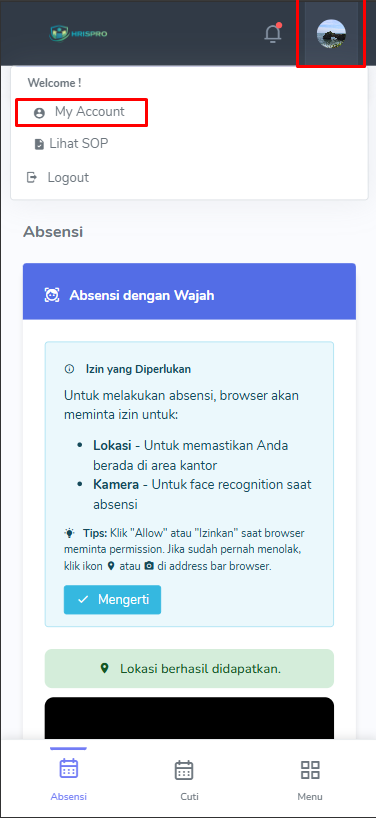
- Masukkan scroll ke bawah ke bagian Employee Profile
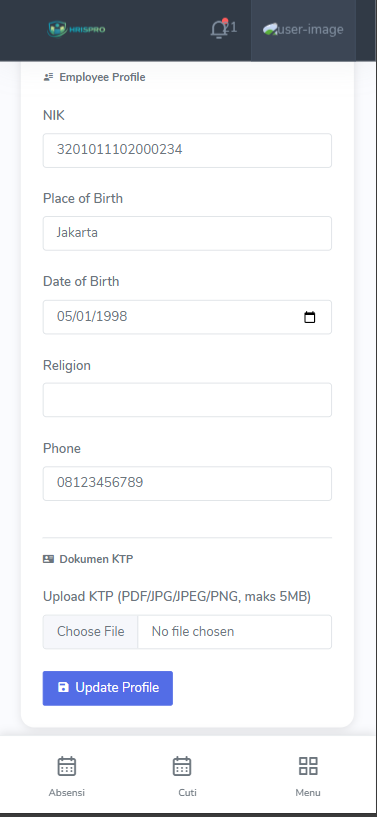
- Silahkan isi NIK, Place of Birth ( tempat lahir ), Date of Birth ( tanggal lahir ), Religion ( Agama ) dan Phone ( telepon ), kemudian klik tombol choose file untuk mengunggah file Identitas anda.
- Setelah itu Klik tombol Update Profile